Get more work from your AI coding plan.
Forecast your usage limits, control subagent burn, and trim unused starting context across Claude Code, Codex and Grok. One local tool, with backups, keep-lists and undo.
Claude Code usage limit reached: how the 5-hour and weekly limits work · How many tokens is 1% of your Claude Code limit? · Do subagents burn your Claude Code limit faster?
Your code and prompts stay on your machine. No AI account credentials required, unless you turn on Grok's weekly usage, which is off by default. Protection and configuration changes remain optional.
npm install -g limitcast
limitcast onboardAll Limitcast features are free and open source under the MIT License, with no subscription, card, account, license key or trial.
Predict: see which window is likely to run out first. Protect: control new subagents when capacity is tight. Trim: inspect unused context and apply reversible cuts.
Recorded on the author's machine: status,
trim --share
and results, unedited.
$ limitcast trim
Every Claude Code session starts at 102.7k tokens before your first message.

## Estimated removable context: ~6.2k tokens (6% of this starting context)
- Disable 9 MCP servers you haven't used in 14 days (~0.9k): postman, context7, ...
- Hide 66 skills from the model (~5.3k): dataviz, block-kit, ...

| Instruction files      8.2k | Tool names          7.1k |
| Skill listing          6.7k | SessionStart hooks  6.5k |
| Agent list             4.9k | MCP instructions    3.1k |
A real run on a heavy user's setup, names shortened. Your numbers come from your own transcripts.
What it found on its author's machine
40 min
warning before a weekly Claude limit ran out, from a forecast that only had the readings it had at the time.
200k vs 10.7M
tokens per 1% of the 5-hour window: new tokens vs cached ones. Cached context is cheap; long sessions and subagents are what run you out.
30%
of Claude tokens went to subagents in a day. That's what the guard watches.
Day one, from limitcast results and
limitcast report. Measure your own:
npx limitcast results.
Claude Code usage limit reached: how the 5-hour and weekly limits
work →
How many tokens is 1% of your Claude Code limit? →
Do subagents burn your limit faster? →
Why a long idle pause costs you: the prompt cache →
Everything you get
Each feature below shows the exact text limitcast prints. The numbers in the samples are an example; yours come from your own readings and transcripts.
Your limits in the status line Free
Every Claude Code prompt shows how much of each window you've used, when it runs out if you keep this pace, and today's even share of the week. Your own status line stays exactly as it was; limitcast adds to it.
Also shows your other Claude account when this one is nearly out,
and a /compact
nudge once a session re-sends more than ~150k tokens per call.
5h 71% ⚠ out 16:40 · 7d 41% · today 6% left

# when you need it:
5h 96% ⚠ near limit · 7d 58% · today 2% over
limitcast: ⇄ other account 5h 12% · 7d 30% · ctx 162k · /compact
Runout forecast Free
Burn rate and the clock time each 5-hour and weekly window runs out, for Claude Code and Codex, and for Grok once you set a dollar cap or turn on its weekly usage. The weekly window is paced over the last full day, nights included, so one busy hour doesn't cry wolf. NEAR at 95%, even before there's a rate.
New in 0.14:
when a window is on pace to run out, status ends with
one line that names the one that runs out first and where else there
is room.
$ limitcast status
window     used  burn      runs out  resets     today     status
claude 5h  71%   +18.2%/h  16:40     17:00      -         AT_RISK
claude 7d  41%   +0.6%/h   -         Sun 03:00  6% left   OK
codex 5h   22%   +4.1%/h   -         18:12      -         OK

You'll hit Claude 5h first (16:40). Codex 5h has 78% left.
Subagent guard
A burst of subagents is the most common way to lose the end of a window. When a window is on pace to run out within 30 minutes, the guard stops new subagents in Claude Code and Codex (and in Grok once you set a dollar cap). While a Claude window is merely tight, new subagents run on Sonnet instead of your main model. Once you're past 100% it steps aside, so paid extra usage keeps working. New in 0.18: a second subagent of the same type and the same prompt is held while the first is still running.
Available to everyone. Install with
limitcast install --guard. The guard acts on new
spawns; LIMITCAST_ALLOW=1 overrides it.
# a new subagent, 21 minutes before the window runs out:
limitcast: Claude 5h limit is 93% used and on pace to run out in
~21 min, before it resets. Finish with the agents already running,
or set LIMITCAST_ALLOW=1 to spawn anyway.

# a new subagent while the window is tight:
limitcast: Claude 5h limit is 88% used; this subagent runs on
Sonnet. Set LIMITCAST_ALLOW=1 to keep the main model.
Your week, paced by the day New in 0.14
The today figure in your status line is your share of
what is left of the week, split evenly over the days until it
resets. Now it acts: with notifications on, you get one message a
day when you have used 80% of today's share. Turn on
limitcast budget today on
and the guard also holds new subagents once today's share is used
up, until local midnight.
The hold is off by default. A window already at 100% is left to the
tool, and LIMITCAST_ALLOW=1 overrides it.
results
shows applied holds separately from historical previews.
# once a day, at 80% of today's share:
limitcast: Claude 7d: 80% of today's share used, 1% left today.

# a new subagent, with the hold on:
limitcast: today's share of your Claude 7d limit is used up (6% of
5%). New subagents are held until midnight. Turn this off:
`limitcast budget today off`, or set LIMITCAST_ALLOW=1 to
spawn anyway.
A model for each kind of subagent New in 0.13
Most subagents just read and search, and they inherit your main
model. Pin a kind to a cheaper one and every new subagent of that
kind runs on it, for example Explore on Haiku. A spawn
that names its own model is left alone, and while a window is tight
a kind pinned to Opus still moves to Sonnet.
results
counts the subagents it moved.
Needs limitcast install --guard. All features are free;
results
records the actions taken. Whether a cheaper model costs less of
your limit per token isn't something limitcast can tell, so check
report --why
after a week.
$ limitcast subagent-model Explore haiku
Explore: haiku

Types you ran in the last 30 days: general-purpose (86), Explore (39), fork (39)
New subagents of these types run on that model unless the spawn names one itself.

# the next Explore subagent:
limitcast: Explore subagents run on haiku, the model you set for them.
Subagent receipts and budgets New in 0.11
Each time a subagent finishes, you see what it cost against your 5-hour window, priced from your own readings (the model never sees it). Set a budget and the guard holds new subagents once they've used that share of the current window, until it resets.
New in 0.12: before a new subagent starts, you see what that kind has cost you so far. It appears once you have 3 priced runs, and only when a typical run is over 1% of a window or the window is near its limit. It never blocks.
limitcast: that Explore subagent used ≈2.1% of your 5-hour window
(34 calls, 180k new tokens).

limitcast: Explore subagents have cost you a median ≈1.2% (max ≈3.6%) of
a 5-hour window over 7 runs; this window is 38% used.

$ limitcast budget subagents 15
Subagent budget: 15% of each 5-hour window. Used this window so far: ≈6.4%.
Once it's spent, the guard holds new subagents until the window resets.
Cold-cache warning New in 0.11
Come back to a big session after a long break and the prompt cache
has expired: your next message re-sends the whole context as new
tokens. limitcast holds that first message once and tells you what
it will cost, so you can /compact first. Send it again
and it goes through. The cache lifetime is 60 minutes by default (LIMITCAST_CACHE_MINUTES).
New in 0.18: after 5 idle minutes the same large session's next message is announced and still sent. The hold stays at 60 minutes. Codex and Grok do not get this warning.
limitcast: this session sat idle for 75 minutes, so its prompt cache has
expired. Your message re-sends 300k tokens of context: ≈1.8% of your
5-hour window (≈0.03% if the cache were still warm). Send it again to go
ahead, or run /compact first to shrink it.
Notifications: desktop, phone or Slack
One notification when a Claude window turns NEAR, AT_RISK or HIT, and one when it resets after a HIT, so you can step away and come back at the right time. On macOS they come from limitcast's own notifier app, listed under its name in System Settings. Linux uses notify-send.
New in 0.11:
the same messages on your phone through
ntfy
(limitcast notify ntfy <topic>) or in a Slack or
Discord channel (limitcast notify webhook <url>).
Opt-in; only the notification text is sent, to the service you
chose.

Claude 5h limit is on pace to run out at 16:40, before it resets at 17:00.
Trim advisor, with apply and undo
Measures what your latest session loaded before you typed (hook
output, MCP servers, tool names, skills, agents, instruction files),
names the ones you haven't used, and what each costs. One command
hides the skills from the model and turns the servers off for that
project; another puts everything back. If Claude Code overwrites the
settings, the cuts come back at the next session. Codex has
trim --codex, and new in 0.12 Grok has
trim --grok: its system prompt and the MCP servers in
~/.grok/config.toml
you haven't used.
New in 0.14:
limitcast trim keep ego-browser
puts a server or skill on a keep-list that no
--apply
ever turns off or hides, for Claude Code, Codex and Grok. It is free
to set, and
trim
shows what it would keep.
Free shows the totals: your starting context and how much of it you never use.
$ limitcast trim --apply
✓ Hid 66 skills from the model (`/name` still works): dataviz, block-kit, …
✓ Turned off 9 MCP servers for ~/work/api: postman, context7, …
Takes effect in your next Claude Code session. Undo: `limitcast trim --undo`

$ limitcast trim --codex --apply
✓ Turned off 3 Codex MCP servers (enabled = false in ~/.codex/config.toml):
  firecrawl, icm, node_repl

$ limitcast trim keep ego-browser
Kept by `trim --apply`: ego-browser
Memory check Free New in 0.16
Claude Code loads only the first 200 lines or 25 KB of
MEMORY.md
into every session, so a note past that is never read.
limitcast memory
shows how much of the index fits, which links are broken, which topic
files nothing links to and which are over 150 lines.
doctor
flags an index that is over the cap.
In Claude Code,
/limitcast:memory-audit
takes the sweep further (stale, contradictory and unlinked notes,
with fixes proposed and nothing changed until you agree), and
/limitcast:memory-split
splits an oversized file into a short hub plus topic files after you
approve the boundary.
$ limitcast memory
Memory: ~/.claude/projects/-Users-you-app/memory
Index: MEMORY.md 62 / 200 lines, 7.1 / 25 KB
Topic files: 18
Not linked from the index (2): old-notes.md, scratch.md
Over 150 lines or 24 KB (1): api-conventions.md (312 lines, 31 KB)
Grok Free New in 0.12
limitcast install
wraps Grok's status line: session model, context % and cost on one
line, with the limitcast forecast under it.
--guard
adds a guard for spawn_subagent, and
trim --grok
measures what Grok loads before you type.
Grok stores what you spent, not a percentage, so the status line shows your 5-hour and 7-day spend until you set a dollar cap. With a cap, limitcast forecasts that window and the guard blocks new Grok subagents when it is on pace to run out.
New in 0.17:
limitcast grok-usage on
shows Grok's real weekly percentage. About every 5 minutes limitcast
asks grok.com for your billing cycle with the login Grok already keeps
in ~/.grok/auth.json.
It is off by default, because it is the one place limitcast uses a
login: the login goes only to grok.com and is never stored or logged.
status, Grok's status line and the guard then forecast the
weekly window like the Claude and Codex ones.
$ limitcast install --guard
$ limitcast grok-usage on
Grok weekly: 9% used, resets 11/1/2026, 7:34:33 PM
$ limitcast trim --grok
Results and the dashboard Free
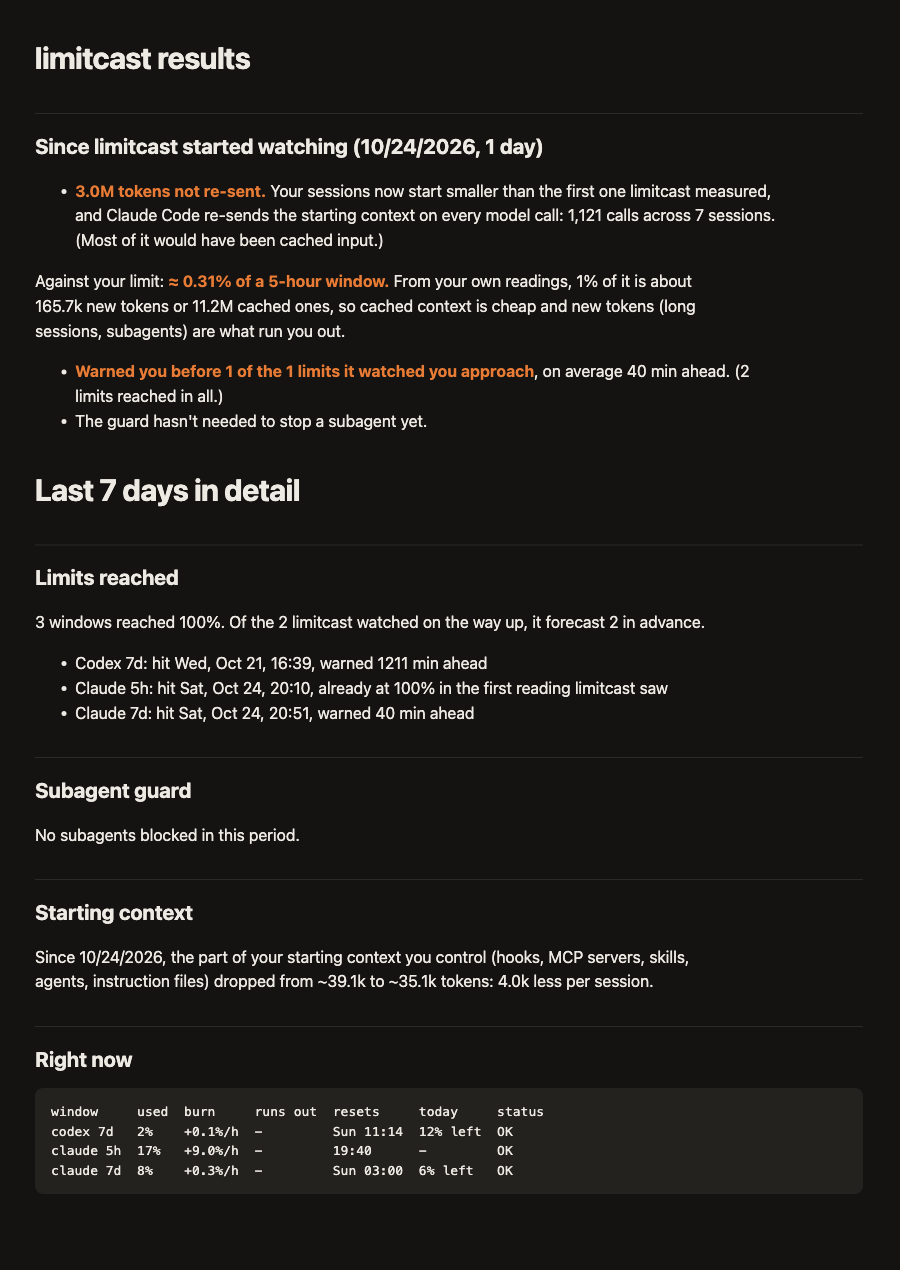
Evidence from your own data: every limit you hit and how far ahead limitcast warned, the tokens your smaller starting context saved, priced against your own 5-hour limit, and what the guard stopped (free: would have stopped) and whether that window then ran out.
Put results, the current windows and the burn report on one page:
limitcast results --html.
Burn report
Claude Code, Codex and Grok tokens by tool, day, project, model and session, read from each tool's own logs, plus the share that went to subagents. See which project or habit is eating your plan.
New in 0.13: the API-equivalent cost: what the same tokens would cost at the API's list prices, per tool, day, project, model and session. It's a yardstick for how much your plan covers, not a bill. Claude models are priced; any other model is left out and counted separately, never as $0. The dollar figure in the example is illustrative. Context reduction is estimated from characters and a recorded baseline; it is not measured cash saved. Blocks and cache notices are events, not proven prevented interruptions.
$ limitcast report --days 7
| tool   | tokens | output | cache reads | share | API-equivalent |
| claude | 863.6M |   2.9M |      840.8M |   99% |           $219 |
| codex  |  12.9M |  44.1k |       12.6M |    1% |              - |

API-equivalent cost: $219 at list prices for Claude models, not what a
subscription charges. 12.9M tokens on other models are not counted.
Subagents used 21% of Claude tokens.

## Top projects
| ~/work/api     | 305.4M | 35% |
| ~/work/web     |  80.8M |  9% |
Does your plan fit? New in 0.13
limitcast keeps the peak of every 5-hour and weekly window you have. Tell it your plan and it says whether you reached your limits often enough to look at the next one, or used so little that a smaller one would have fit, with the monthly price difference. It also shows what your tokens would cost at API list prices, so you can see what your plan covers.
It needs a week or two of history before it recommends anything, and it cannot see extra-usage spend. Anthropic states the 5-hour multiplier for Max (5x or 20x Pro); the advisor assumes weekly limits scale the same way. Example output below; your numbers will differ.
$ limitcast plan set max20
$ limitcast plan
Claude plan: Max 20x, $200 a month

Over 16 days: 63 five-hour windows with use (0 reached the limit, busiest
20%), 2 weekly windows (0 reached the limit, busiest 15%).
Max 5x would have fit: it has 1/4 of the usage per session, so your busiest
5-hour window (20%) would have been about 80% and your busiest week about
60%. That saves $100 a month ($100 vs $200).

At API list prices your Claude Code tokens of the last 16 days would have
cost $1,240 (about $2,325 a month at this pace), against $200 for your plan.
Where your tokens went New in 0.12
The burn report says how much you used; this says what it was spent on. limitcast sorts the new tokens, the ones that move your limit (cached reads barely count), into subagents, session starts, cache rebuilds after an idle pause, tool results by tool and model output. It splits subagents by type and model, lists the single steps that cost the most, and says what to ask for instead.
Claude Code only. The first run reads your transcripts once and caches them. Models may count differently against your limit, so the model tables show token counts, not window shares.
$ limitcast report --why
115.2M new tokens (input, cache writes and output; cached reads are left out).

| where                                                  | new tokens | share | 5-hour windows |
| Subagents                                              |      46.1M |   40% |           ≈3.1 |
| Model output (generated, then cached on the next call) |      18.3M |   16% |           ≈1.2 |
| Tool results                                           |      16.7M |   14% |           ≈1.1 |
| Cache rebuilds after an idle pause                     |      15.5M |   13% |           ≈1.0 |
| Session starts, headless runs (563)                    |      14.8M |   13% |           ≈1.0 |
| Session starts, interactive (47)                       |       4.0M |    3% |           ≈0.3 |

## What to try
- 127 single steps added over 20.0k new tokens each: 23% of all
  tool-result tokens, mostly mcp:linear.
- mcp:linear (6.8M, 7.7k per call): ask for fewer fields and a smaller limit.
Heaviest scheduled-job starts New in 0.12
Every run of a script or scheduled job that calls
claude -p
pays your whole starting context again. limitcast groups those runs
by the first words of their prompt and shows, per job, how many
runs, how many new tokens each start cost, how big the starting
prompt was, how many starts were cold (the prompt cache didn't have
them) and whether starting a job's runs closer together would help.
It ends with how to launch a job leaner.
New in 0.18: when two runs of a job both recorded a startup
breakdown, the report names the piece that changed between them.
The example's job names are changed. The report shows the first 45 characters of each prompt, on your machine only: don't paste it publicly unredacted.
$ limitcast report --jobs
566 headless runs spent 14.8M new tokens just starting: 13% of all new tokens.

| job (first words of its prompt)        | runs | new at start | prompt | cold |
| Prepare the nightly brief for the team |  283 |        25.6k |  34.4k |  99% |
| Update the weekly status canvas        |  154 |        32.4k |  32.4k | 100% |
| Review this change for security issues |  106 |        15.3k |  17.5k |  79% |

## Cold starts
537 of 566 runs (95%) started cold: more than half of their starting
prompt was new tokens, not served from the prompt cache.
Alerts and a weekly summary
At the start of a session, a message to you (never the model) when your starting context grew by ~1k tokens or more, naming what grew: a new plugin, a longer CLAUDE.md, a chatty hook. Once a week, one line on recorded controls and estimated context reduction. `results` adds per-tool consumption and next steps; estimates are separate from actual usage and previews.
limitcast: your Claude Code starting context grew ~3.4k tokens
since your last session (MCP server instructions: linear new~2.1k,
Instruction files: ~/CLAUDE.md +~1.3k). Run `limitcast trim` for details.

limitcast this week: 2 limits reached, warned ahead on 2 (avg 38 min),
guard blocked 3 subagents, moved 5 to Sonnet, 1.9M tokens not re-sent.
Large tool-output notice New in 0.12
A tool result enters your context once as new tokens and is then
re-read on every later call, so one very large result is worth
knowing about. When a single result is about 20k tokens or more,
limitcast tells you (never the model), once per tool per session,
with what to ask for next time. Turn it on with
limitcast install --alerts;
LIMITCAST_TOOL_TOKENS
changes the threshold.
It runs on Bash, Read, Grep, WebFetch and MCP tools, and adds about 30 ms per call.
New in 0.18: the same
install --alerts also checks before the call. After
report --why or report --jobs, a Read,
Grep, or MCP tool whose results averaged at least 5k tokens is held
when the call sets no limit, or its limit is lowered when it is too
high. Bash and WebFetch are left alone. Re-run
install --alerts to add the check.
limitcast: that linear list_issues result was ≈25k tokens (≈0.17% of a
5-hour window to write, then re-read on every later call). Next time:
ask for fewer fields and a smaller limit.
Limit-change alert New in 0.11
Every day limitcast re-measures how many tokens move your 5-hour meter by 1%, from your own readings. When that shifts by 15% or more against the weeks before, you get a notification, so you know when the limit itself changed rather than your habits.
Your Claude limit looks smaller: 1% of the 5-hour window now takes ~139k new tokens, down from ~167k.
Run it after the reset
Out of room with a long job still to run? Queue it: limitcast waits for the window to reset and starts it in the background.
$ limitcast after-reset --detach -- claude -p "run the full test suite and fix failures"
Will run at 17:00 (after the claude 5h reset), in the background. Output: ~/.local/state/limitcast/after-reset-1793044800000.log
Set up once, checked every day Free
install
backs up your settings and uninstall restores them
exactly. A daily background check tells you in the status line if
anything breaks, including a Claude Code, Codex or Grok log-format
change. Hooks survive Node upgrades. In Claude Code, the plugin adds
/limitcast:status, /limitcast:results,
/limitcast:trim, /limitcast:memory-audit and
/limitcast:memory-split.
$ limitcast doctor
✓ Status-line recorder installed
✓ Hook launcher points at this Node and limitcast
✓ Claude Code subagent guard installed
✓ Codex subagent guard installed and trusted
✓ Last Claude reading 0 min ago
✓ Claude Code status-line feed: limit readings present
✓ Memory: 18 files, index 62/200 lines, 7/25 KB, no problems
Free to install, yours to control
-
Install.
Use the install command, then
limitcast onboard. -
Inspect.
Check your setup with
doctorand your context withtrim. -
Enable protection.
Run
limitcast install --guard --alerts, restart your coding tool and approve the Codex hook when asked. -
Review.
Use
limitcast resultsto see usage, context-reduction estimates and applied controls, with no purchase or activation step.
How it compares
| limitcast | ccusage | ClaudeBar | CodexBar | CodeBurn | agent-usage-guard | |
|---|---|---|---|---|---|---|
| Price | Free; all features, MIT License | Free | Free | Free | Free | Free |
| What it is | CLI, status line and hooks | CLI reports | macOS menu bar app | Menu bar app (macOS, Linux) | Desktop app and CLI (macOS, Windows, Linux) | Claude Code mod |
| Tools covered | Claude Code, Codex, Grok | 18 tools | 10+ tools | Many providers | 37 tools | Claude Code |
| When you'll run out | Clock time from your burn rate, plus today's share of the week | 5-hour block tracking | Pace label (running hot / on track) | Countdown to each reset | Whether the month is on pace to run past your plan | No forecast; asks once a window is 80% used |
| Stops subagents before you run out | Yes, Claude Code, Codex and Grok (with a dollar cap or its weekly usage on); on a tight window, moves new Claude subagents to Sonnet; optional subagent budget per 5-hour window | No | No (hooks observe only) | No | Spending caps per session ($5 warn, $15 stop by default), not per window | Yes, Claude Code: asks before new agents and caps fan-out |
| Measures what loads into every session, and cuts what you don't use | Yes, Claude Code, Codex and Grok, with apply and undo | No | No | No | Finds waste and applies reversible config changes (Optimize) | Asks before re-reading a very large context |
| Uses your logins | No | No | Yes, for its usage API probe | Yes, reuses provider sessions (OAuth, cookies) | For live limits (codeburn quota) |
No |
From each project's public README, October 2026. If you only want to see your numbers, the free tools are great. If you only want subagent caps in Claude Code, agent-usage-guard is a good free option; limitcast adds the runout forecast, Codex, and the starting-context trim.
Get your first useful result
npm install -g limitcast
limitcast onboard          # read-only checks and your next useful step
limitcast install          # backs up settings and adds the recorder
-
Confirm setup.
Restart your coding tool, complete one normal turn, then run
limitcast doctorandlimitcast status. Doctor checks setup; Trim analyzes context. -
Find an opportunity.
Run
limitcast trim,limitcast trim --codex, orlimitcast trim --grok. Names and estimates are included. Nothing is trimmed until you explicitly use--apply. -
Try protection.
Run
limitcast install --guard --alerts, restart, and approve the Codex hook if asked. The installed guard can hold new agents when the forecast or an enabled budget calls for it. -
Review recurring value.
Run
limitcast resultsafter a week: recorded usage, estimated context reduction, applied controls and historical actions. Share totals voluntarily withlimitcast results --share.
Requires Node 20+, macOS or Linux. Keep essentials with
limitcast trim keep <name>. Reverse cuts with
limitcast trim --undo
(add the matching provider flag).
limitcast uninstall
restores the recorder setup. The guard holds new spawns; it does not
stop existing agents or guarantee no lockouts.
Help shape Limitcast
Use Claude Code heavily, or work across Codex and Grok? Start free and try it in a normal work session. We are looking for founding users willing to discuss setup, protection and recurring value.
Ask about the founding-user pilot. Feedback and follow-up are voluntary. Share totals only; keep your prompts and source code private. All features are free; no trial is needed.
All features. Free.
Free and open source
Forecasts, agent protection, model controls, budgets, reversible trimming, notifications and reports are all included, with no account, card, trial, subscription or license key.
Created by Sam Stull. Use, study, modify and redistribute Limitcast under the MIT License.
Install Limitcast View source on GitHubFAQ
Does it send my code or prompts anywhere?
Limitcast reads usage and session logs locally, needs no license key or payment-service connection, and does not upload code or prompts. Optional phone or webhook notifications send notification text to the service you configure; they are off by default. Grok's weekly usage is also off by default; when you turn it on, your Grok login goes to grok.com, and nowhere else, to ask for your usage.
Does it use my Claude login?
No. It never touches your subscription credentials, so it can't put your account at risk.
I use extra usage past my limit. Will the guard block me?
No. Once a window is used up, limitcast steps aside and leaves it to Claude Code. The guard only acts while you're heading toward a limit.
Does it work with Codex and Grok?
Codex: yes, forecasts, the subagent guard and the burn report, from
the logs Codex already writes. Grok: yes, the burn report, a status
line, the trim advisor and the subagent guard. Grok keeps no
percentage used on disk, only spend, so the status line shows your
5-hour and 7-day spend; set a dollar cap (limitcast budget grok 20) and limitcast forecasts that window and the guard blocks new Grok
subagents when it is on pace to run out.
Is the dollar figure what I actually pay?
No. The dollar figure is what the same tokens would cost at the API's list prices. A Claude subscription is a flat monthly fee, so the figure is a yardstick for how much your plan covers, not a bill. limitcast prices Claude models only: tokens on other models are left out and counted separately, never as zero. The prices are in the code as of 26 October 2026, and you can change them in a small file.
What if I have two Claude accounts?
Sessions of the same account share one history (matched by their limit reset times and usage that only rises), so even a short session gets a forecast, and two accounts used in parallel never mix.
Will one heavy hour make it say I'll run out of my weekly limit?
No. The 5-hour window is forecast from the last hour's pace. The weekly window uses your average pace over the last full day, idle time included, so a burst on Monday doesn't predict a runout by Wednesday. The exception is a burst that would use up the week within the next hour: that still triggers the warning and the subagent guard.
Do I need a subscription or license key?
All Limitcast features are free and open source under the MIT License, with no subscription, card, account, license key or trial.
What happens to an older license?
Update to Limitcast 0.15.0 or later. All features work without a license key, and older local license files are left untouched. For help with a previous purchase, contact support@limitcast.dev.